Coverage for your entire home
Every room, every device
You already know which rooms are the problem. Pick the package that covers them, or answer a few questions and we’ll narrow it down. Either way it arrives set up for your home.
- Arrives preconfigured
- Assisted DIY install
- Month-to-month support plan
- Own your hardware
How it works
Find the package that fits, tell us how you want it set up, and it arrives ready to go in. Put it in yourself or have us do it.
Find the one that fits
A few questions about your home, and we’ll point you at the package that suits it. It takes a couple of minutes, nobody is coming out to look, and if your property is the sort a package wouldn’t do justice to, we’ll say so.
Tell us how you want it
Your network names, your password, whether guests get their own, what the kids are allowed to reach. We build all of that in before it ships, and mark each piece for the room it belongs in, so you’re matching labels to rooms rather than reading a manual.
Put it in yourself, or we do
Most of it is plugging things in where the labels say. The documentation walks you through the rest, and we’re a phone call away if you get stuck. If you’d rather not do any of it, we come out and do the whole thing.
Call us when something is wrong
On the support plan that comes with it, our AI assistant picks up with your system’s details open and handles the simple things while you’re on the phone. When you need a person, you can reach one of us.
Full bars everywhere, not just near the router
A bigger router doesn’t fix distance. Signal drops off through every wall it crosses, so the answer is more access points closer to where you actually sit. Upstairs, out back, in the garage, your phone connects to whichever one is nearest instead of straining for the one by the front door.
Video calls that don’t freeze
A bad connection shows up fastest on a work call. An access point near the room you work in keeps the signal strong, and the gateway keeps that traffic moving when the rest of the house is busy. On the In-Wall package, the access point in that room has spare network ports for a cable to your desk.
Gaming that isn’t at the mercy of the house
A console on a cable never fights the rest of the house for Wi-Fi, and the In-Wall package has spare ports in each room. Where a cable can’t go, the Mesh package, or the Wired package with Pro access points, gives it a lane of Wi-Fi the rest of the house barely touches.
Everyone streaming at once
Four screens going at seven in the evening is less about speed than about how many devices one access point is juggling. Spread them across two or three access points and each one has far less to handle, which is when the buffering stops.
Guests and smart devices, kept apart from yours
Visitors get their own network with its own password. Doorbells, thermostats and televisions sit on another. Neither of them can reach the laptop you do your banking on.
Room to add to it later
Another access point for a finished basement, cameras on the same switch, a cable behind a television. The system is built to take more without replacing what’s already there.
Pick the one that suits your home
Prices cover the hardware and the setup. Add what your home needs, or have it designed around the property if none of them are right for it.
No cable to run
Two small units that stand on a shelf and plug into an outlet. They reach each other over the air, so there’s no cable to run and nothing fixed to the building.
Features
- Wi-Fi 7 with 6 GHz on both units
- Nothing to drill: they stand on a shelf and plug in
- Arrives configured, and looked after on your support plan from the day it ships
- Separate networks for guests and devices
- A secure way into the network from anywhere, with UniFi’s built-in VPN
- Not included: Ready for internet plans faster than 2 gig
What’s included
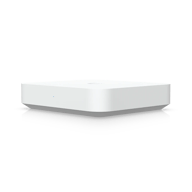
Gateway Max2.5G
Gateway
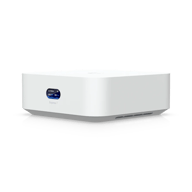
2UniFi Express 76 GHz
Wi-Fi 7 mesh access point
Gateway
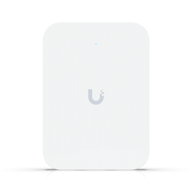
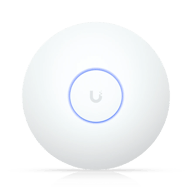
What’s included
Whichever one you choose, this is what you get.
- Your Wi-Fi names and passwords, set before it ships
- Every piece marked for the room it belongs in
- Smart-home and guest devices kept off your own network
- Documentation, and a technician a phone call away
- A connection test once it’s running
With every system
Support Plan
$35per month
One flat fee, whatever ends up on the property. No long-term contract, and nothing stops working when it ends.
How the Plan WorksWhat it covers
- Someone to call during business hours when something is wrong
- We’re alerted when your equipment goes offline, and we fix what we can remotely
- Replacement hardware configured before it reaches you, so it drops straight in
- Firmware and security updates on a schedule
- Getting the network back online after your internet company swaps the modem†
- Forgotten Wi-Fi passwords and guest access, handled on a call
- Content and site blocking on the devices you choose†
- Port forwarding when a game or a work tool needs it†
- Setting the system up again when you move
† Requires a managed gateway
What we can see, and what we can’t
Letting a company into your home network is a real thing to be uneasy about. Here’s exactly what we see and what we don’t, and it’s written into our privacy policy.
We run your network for you
Your network runs from a controller we operate while your support plan runs, which is what lets us fix things without coming out. You get full access in the UniFi app, and we see what you see there: settings, device names and what’s connected. Our agreement limits who at Magnetics can use it.
Traffic inspection stays off
The equipment is capable of inspecting traffic for threats and for usage patterns. What that produces is visible to us as well as to you, which is why it is switched off unless you ask for it.
Common questions
Whatever brings the internet in is fine. Starlink, 5G home internet, a cable modem, fiber or DSL all hand off the same way, and the system plugs in behind whatever your provider gave you. You keep your account and your provider; we take it from the cable.
Not with the Mesh package. Those units talk to each other over the air, so there’s nothing to pull through a wall. The wired packages need a cable to each access point, and if your home already has cable in roughly the right places, that part is done.
No. We’ll come out and do it. If you’d rather do it yourself, everything arrives labeled with documentation, and we’re a phone call away if you have a question.
Yes, and most of all if the console can go on a cable. Lag is latency rather than bandwidth, and a wired console stops competing with phones and televisions for airtime. Where it can’t, 6 GHz is the next best thing, on the Mesh package or the Wired package with Pro access points.
If the trouble is coverage, almost certainly. If the service coming into your home is the limit, no amount of Wi-Fi will raise it. We can’t tell which from the outside, so we test the connection once everything is running and tell you exactly what you have.
Design My System asks a few questions about your home and lands on the one that fits. If you’re still unsure, contact us and we’ll help you pick.
Each piece arrives labeled with the room it goes in, taken from what you told us. If you want placement set properly against the building itself, that’s what a custom design is for.
Large homes, modern builds full of glass, steel and concrete, properties with a detached building to reach, and homes with a working office or studio in them. It’s also the answer when you want more say over the hardware’s finish and how it fits into your home. It performs better because every part of it was chosen for your building, and it costs more, starting with the design itself.
Yes. Any package can take an outdoor access point, built for the weather. For a big yard or a building out back, a custom design measures how far the signal has to carry and what’s in the way.
Yes. Thermostats, doorbells, televisions, speakers, hubs and everything else with an app of its own goes on a separate network, kept away from your laptops and phones. Whichever assistant you already use keeps working on top of that.
Yes. Every Wi-Fi and security package is UniFi, so the Wi-Fi, cameras and alarm run as one system, and one call to us covers all of it.
The new modem usually has to be set up to work with your gateway. On a support plan, with a managed gateway, you call us and we set it up remotely, usually while you’re still on the phone.
The Mesh package will. The units stand on a shelf and plug in, and they come with you when you move. The wired packages need cable run through the walls, which takes your landlord’s permission.
The hardware carries its manufacturer warranty either way. On a support plan we set the replacement up before it reaches you, so it drops into place and works, rather than arriving as a box you have to configure.
Also from Magnetics Residential
Still not sure which one?
Answer a few questions about your home and we’ll point you at the package that suits it. It takes a couple of minutes, and you can call us instead if you’d rather just talk it through.